
Thanks for the report. I've found additional issues not addressed in the previous fix.
Download the new build and let me know if clicks persist. The fix should handle all cases of v1.10 project loading.
Updated Matilde Tracker
Re: Updated Matilde Tracker
Last edited by george on Tue Dec 09, 2025 10:06 pm, edited 1 time in total.

Re: Updated Matilde Tracker
Amazing, thanks. Will let you know later.
Re: Updated Matilde Tracker
Still getting the high amp clicks and pops I'm afraid, along with some erratic other crazy sounds. Let me know if there's any more specific info I can pass over.
Re: Updated Matilde Tracker
Thanks for the report. I'm confused about the issue. Buzz installs Matilde Tracker2.dll, which doesn't conflict with the latest Matilde Tracker (Matilde Tracker.dll). I can't load Matilde 1.09 on the latest Buzz, and I can't find 1.10 anywhere. Renaming the latest one seems like the best workaround.
I added new fixes, but we're in a bit hit and miss scenario.
I added new fixes, but we're in a bit hit and miss scenario.
- Attachments
-
- MatildeTracker113.zip
- (47.31 KiB) Downloaded 323 times
Re: Updated Matilde Tracker
Huge thanks for your time, this might be a total dead end and given that it seems to be fine if you start from scratch OR just leave it on filter mode 2 then that may be how it is...
I've always used the multi-out mtracker as 'Matilde Tracker3.dll' and that's what I've been copying these updates to. Could that be overly confusing matters?
I've always used the multi-out mtracker as 'Matilde Tracker3.dll' and that's what I've been copying these updates to. Could that be overly confusing matters?
Re: Updated Matilde Tracker
Hey @george
Your updated, updated version of Matilde *seems* to play better in ReBuzz than in old Buzz. I don't have empirical proof of this but my testing the improved SINC setting in old Buzz has usually had it using a lot more CPU than is really feasible whereas in ReBuzz that doesn't *seem* to be an issue. How much of a task would it be (given we now have absurdly powerful AI coding tools to help us) to create a 64bit version of it? Is your updated source for it available anywhere?
Your updated, updated version of Matilde *seems* to play better in ReBuzz than in old Buzz. I don't have empirical proof of this but my testing the improved SINC setting in old Buzz has usually had it using a lot more CPU than is really feasible whereas in ReBuzz that doesn't *seem* to be an issue. How much of a task would it be (given we now have absurdly powerful AI coding tools to help us) to create a 64bit version of it? Is your updated source for it available anywhere?
Re: Updated Matilde Tracker
I guess 3 seconds but how would the 64-bit version help?
Re: Updated Matilde Tracker
I'm thinking some overhead might be reduced by the processes running directly under the ReBuzz main process rather than via the 32bit bridge. Is that naive?

Re: Updated Matilde Tracker
I think it might be better if the new build is called Matilde Tracker2.dll as the original Matilde Tracker only had one parameter vs Matilde Tracker 2's six parameters (i.e. from version 1.7 and up)
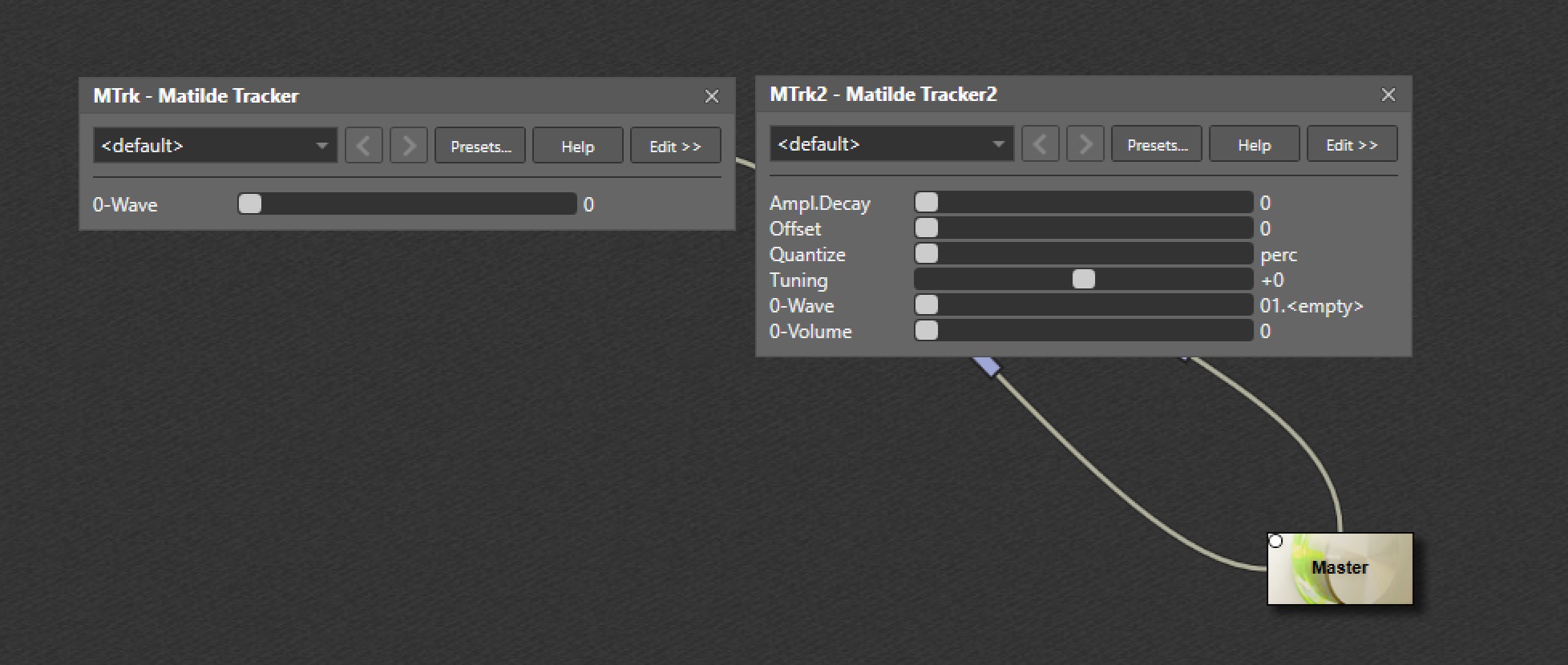
Loading old projects with these latest builds of Matilde Tracker.dll causes all Matilde patterns in that project to be empty - presumably due to this parameter mismatch ( viewtopic.php?p=17903#p17903 )
Re: Updated Matilde Tracker
Oh, feel free to rename the dll on the zip.